How AI turns field service ticket data into action
This article is also available in German
Field service teams often lose time before the work even reaches the technician.
The ticket exists. The customer has explained the problem. The workflow is ready. But the information inside the ticket is messy, too long, written in another language, or spread across several fields. Someone still has to read it, understand it, correct it, and decide what should happen next.
AI should not create another step. It should remove one.
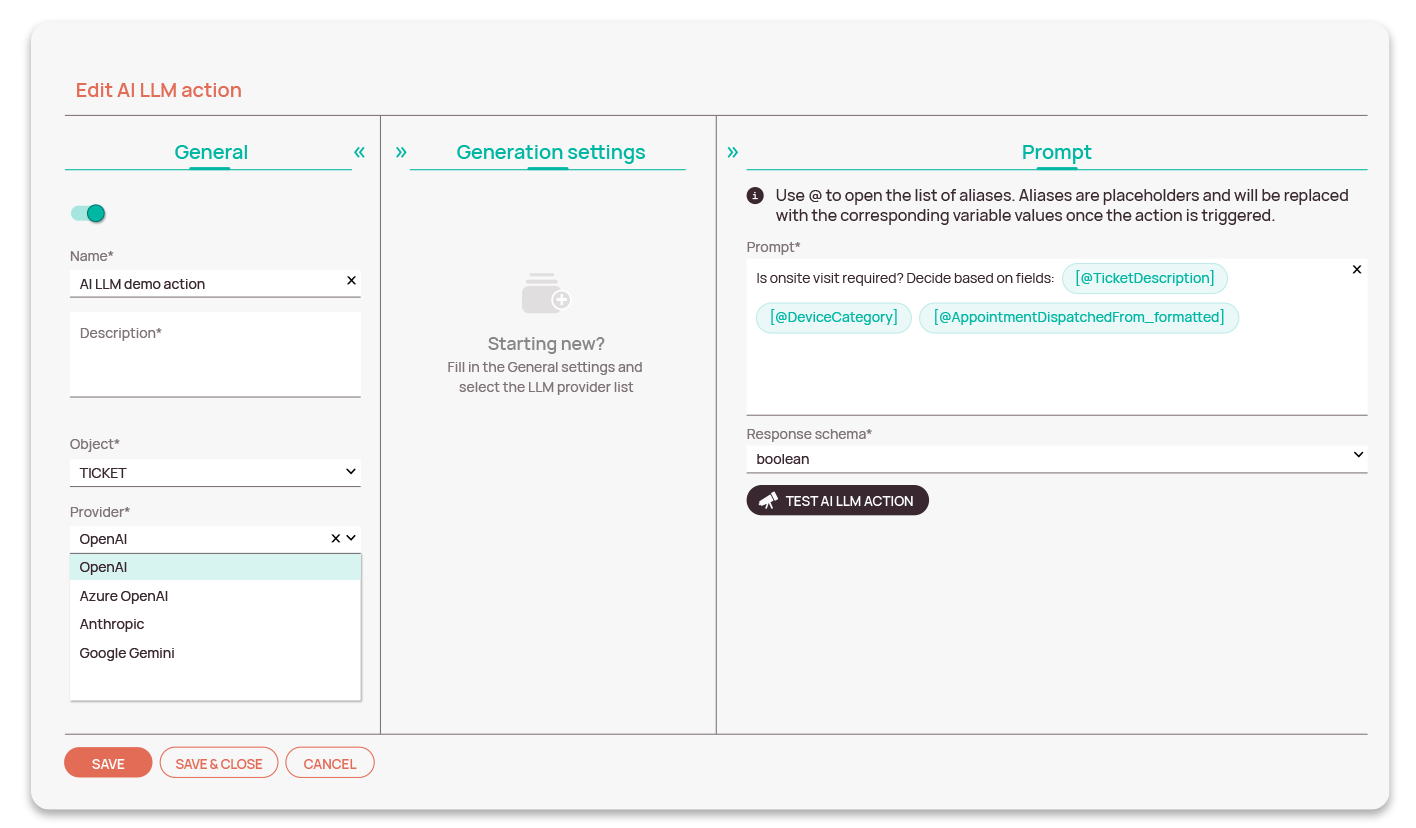
That is the idea behind Fieldcode’s AI LLM action. Instead of asking teams to copy ticket data into a separate AI tool, the AI LLM action works inside the workflow itself. It’s designed to turn ticket and object data into clear next steps. It can summarize, translate, clean up, check, and support workflow decisions without forcing dispatchers, admins, or support teams to manually interpret every field.
Why messy ticket data slows down field service workflows
Field service workflows depend on clear information.
A ticket may need to move to scheduling, validation, spare parts review, customer communication, or escalation. But that decision is only as good as the data behind it.
In real operations, ticket data rarely arrives perfectly prepared.
A customer may describe the issue in a long message. A technician may write a useful work summary, but in a language the customer cannot read. A phone number may be missing the country code. An address may include building notes that make routing harder. A problem description may contain clues about spare parts, but no one has time to read through every detail before the next job is planned.
These small data problems create real operational delays:
- Dispatchers spend time interpreting tickets instead of managing exceptions.
- Support teams manually rewrite or translate customer updates.
- Technicians receive unclear job context.
- Automation pauses because someone still needs to check the next step.
- Poor field data affects calls, routing, reporting, or scheduling.
The issue is not always missing information. Often, the information is there but needs human cleanup before the workflow can use it.
How AI workflow automation helps field service teams
AI workflow automation brings AI into the service process instead of keeping it as a separate tool.
With Fieldcode’s AI LLM action, teams can define where AI should run inside a workflow and which ticket or object fields it should use. The prompt can then return a usable result that helps the workflow continue.
That may sound technical, but the practical value is simple.
The workflow can read selected information from a ticket and help answer questions like:
- What is the short version of this issue?
- Does this description need to be translated?
- Is the address or phone number usable?
- Should this case move to validation, spare parts review, or onsite scheduling?
Instead of asking someone to read every field manually, the workflow can use AI to prepare the information and support the next action.
This matters because AI is not working outside the process. It becomes part of the workflow logic. The result can update a field, support a decision, or help move the ticket to the right step.
Examples of AI workflow automation in field service
The strongest use cases are not abstract. They are the small checks and rewrites that happen every day.
A customer writes in a language the technician does not speak
The workflow can translate the issue description before the technician receives the job. That helps the technician understand the request earlier and reduces unnecessary clarification.
A technician writes a long work summary
The workflow can turn several notes into a short customer-facing update. The back office does not need to rewrite the explanation manually, and the customer receives a clearer summary of what happened.
A ticket description is unclear
The workflow can review selected ticket fields and help identify whether the case should move to validation, spare parts ordering, or onsite scheduling. That helps teams avoid sending work into the wrong process path.
A phone number or address is messy
The workflow can clean up data before another automation starts. For example, a phone number can be checked before an outbound call through voice AI agents, or an address can be normalized before routing.
This is where AI becomes practical. It reduces the manual reading, rewriting, and checking that slows down service execution at scale.
How AI workflow actions support Zero-Touch automation
Zero-Touch automation works best when workflows have enough context to move confidently from one step to the next.
That context is not always simple. A workflow may need to know whether a ticket should go to scheduling, validation, spare parts review, customer communication, or escalation. When that decision depends on long notes, mixed languages, or inconsistent field values, automation can still need a manual check.
Fieldcode’s AI LLM workflow action adds another layer of support to that process. It helps interpret ticket or object data before the workflow continues, so teams can apply the same logic more consistently across high ticket volumes.
This matters most at scale. One summary, translation, data cleanup, or workflow decision may feel minor on its own. Across a full service operation, those small steps affect dispatcher workload, technician preparation, response times, and customer communication.
The point is not to replace operational control. It is to give workflows better information earlier, so people spend less time preparing data and more time handling exceptions.
This shift is also visible in broader market coverage. FSM News reported that the field service management software market is projected to grow at a 12.20% CAGR from 2025 to 2032, with AI adoption named as one of the trends shaping how FSM platforms support scheduling, decision-making, and customer interactions.
Conclusion
AI in field service becomes valuable when it helps work move forward.
Not in a separate chat window. Not as another place to copy and paste ticket details. But inside the workflow, where service data already supports scheduling, validation, communication, and dispatching.
That is what makes Fieldcode’s AI LLM action useful. It helps teams turn unclear ticket and object data into usable next steps. That means fewer manual checks, fewer workflow pauses, and more consistent service execution.
Want to see how AI can support your field service workflows in practice? Book a personalized demo and explore how Fieldcode turns ticket data into action.
Knowledge tip
AI workflow automation works best when it starts with one repeatable operational problem. A good first use case could be ticket summaries, translated technician notes, or checking whether a case needs validation before dispatch. In field service management software, AI becomes more useful when its output can support a real workflow step instead of staying as disconnected text.
FAQ
What is AI workflow automation in field service?
AI workflow automation uses AI inside service workflows to prepare ticket or object data for the next step. It can summarize notes, translate fields, clean data, or help decide whether a case needs validation, spare parts, or an onsite visit.
How can AI reduce manual checks in field service?
AI can review selected ticket fields before the workflow continues. This helps teams avoid manually reading every description, rewriting updates, correcting messy data, or checking whether the ticket belongs in the right process path.
How does Fieldcode use AI inside workflows?
Fieldcode’s AI LLM action lets teams use ticket or object fields inside defined prompts. The result can update fields or support workflow logic, helping service processes continue with clearer information and fewer manual checks.