


Analyze and manage your service tickets from your AI assistant
Connect ChatGPT, Claude, or any MCP-compatible AI assistant to Fieldcode through the MCP connector. Identify SLA risks, find patterns across service tickets, and make updates across multiple tickets using natural language and live Fieldcode data.
Get a demo



What is Fieldcode MCP?
The Fieldcode MCP connector is a Model Context Protocol (MCP) integration that connects AI assistants like ChatGPT and Claude to your field service operations. It lets your team analyze live service data, identify critical tickets, and make updates across multiple tickets using natural language.
What you can do with Fieldcode MCP

Analyze service data
Spot recurring faults, compare repair times across regions and technicians, and identify service trends without reviewing tickets individually.

Manage service exceptions
Identify SLA risks, prioritize jobs waiting for parts, and assess scheduling options when technicians become unavailable.

Update multiple tickets
Reschedule jobs, update tickets from partner reports, and trigger customer communications through existing Fieldcode workflows.
How service teams use Fieldcode MCP
A few examples to get you started.
Dispatcher
Which of the tickets waiting for part X should go first?
12 tickets are waiting for part X. Based on SLA and customer priority, I’d start with these:
- #48213 Hamburg · SLA ends today, 16:00
- #48190 Berlin · critical site, SLA ends tomorrow
- #48177 Köln · SLA ends in 3 days
Anna is off sick today. What’s most urgent, and who can take her jobs?
Anna has 5 jobs today, 2 of them urgent. Mark has the skills and the time for both:
- #48230 Hamburg Hafen · urgent → Mark
- #48241 Altona · urgent → Mark
Should I reassign them and notify the customers?
Service manager
Which tickets are at risk of breaching their SLA this week?
9 tickets are at risk of breaching their SLA this week. Most of them are in the north:
- Nord 6 tickets · waiting for parts
- Süd 2 tickets · no technician available
- West 1 ticket · customer not reachable
Is there a pattern in repair duration by region or technician?
Yes, there is a pattern by region. Average repair duration over the last 90 days:
- Nord 2.1 days
- West 2.3 days
- Süd 3.5 days
Most of the gap in Süd comes from longer travel distances between sites.
Service coordinator
Cancel all of Nordwind Facility Services’ tickets at the Hamburg site next week.
I found 14 open tickets for Nordwind Facility Services at the Hamburg site next week (Mon–Fri).
Should I cancel all 14 and notify the assigned technicians?
Update these tickets from the partner report I just pasted.
I matched 8 of 9 rows to tickets and updated their status and completion date.
- NW-0417 no matching ticket · left for you to check
Admin
Build a workflow for parts returns.
I drafted a “Parts return” workflow with 4 steps. It’s saved as a draft so you can review it first:
- 1 Return requested
- 2 Approved
- 3 Part shipped back
- 4 Closed
Create users for the new Berlin team.
I created 6 users for the Berlin team and sent their invitations.
Should I also assign them to the Berlin service area?
How to connect Fieldcode to your AI assistant
01
Your existing roles and permissions apply automatically.
No separate permission setup is needed. The roles and filters already configured in Fieldcode carry over, so the AI assistant follows the same access restrictions.
02
Your admin enables access.
MCP is switched on for your Fieldcode environment, so it’s only available when your company decides.
03
Each user connects their AI assistant.
In Claude or ChatGPT, add Fieldcode from their app directory. Other MCP-compatible assistants connect using the Fieldcode MCP link instead. Every user signs in with their own Fieldcode account.
How Fieldcode MCP keeps your data secure
Fieldcode MCP uses the same access permissions and operational rules already configured in your Fieldcode environment. Your organization stays in control of who can access service information and which actions they can perform.

User-based access
Each user connects with their own Fieldcode account and can only access information and actions permitted by their existing roles and ticket restrictions.

Existing operational rules
Ticket updates follow your configured workflows and service deadlines. Scheduling requests use Fieldcode’s optimizer and scheduling assistant, applying your existing scheduling rules.

Administrator-controlled access
Your organization decides whether MCP is enabled, while existing Fieldcode permission settings determine what each user can access.

How Fieldcode MCP works with Fieldcode’s AI capabilities
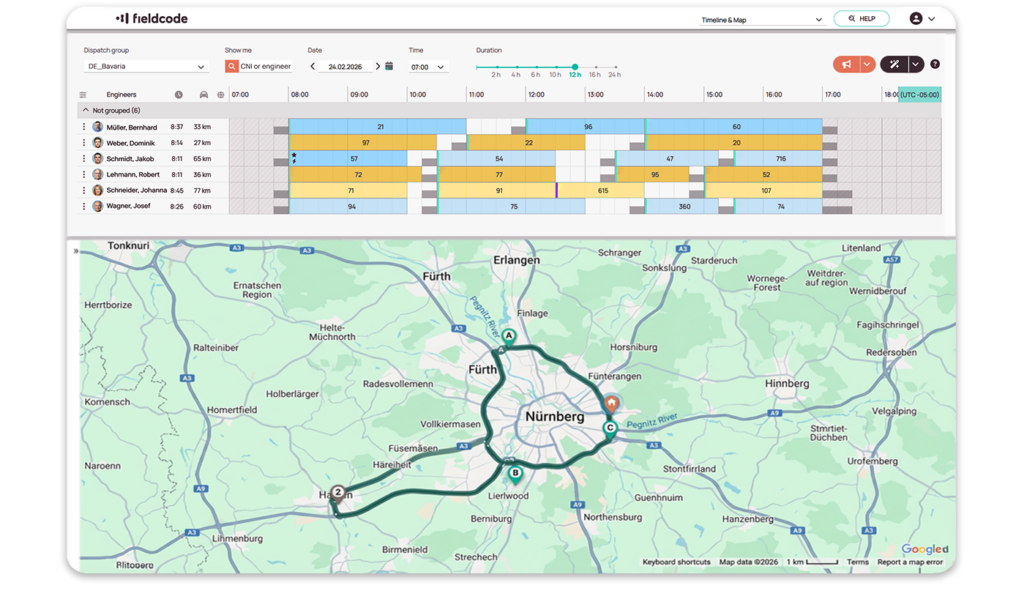
Fieldcode doesn’t treat AI as a separate tool. Each AI capability supports a different moment in the service process, from the first call to the finished job. Fieldcode MCP connects these capabilities, so one request in your AI assistant can trigger Voice AI calls for a group of tickets, prepare ticket data, or replan the day with AI scheduling.



Frequently asked questions
1. What is MCP?
MCP (Model Context Protocol) is an open standard that lets AI assistants connect to business software. It allows an AI tool to read data and take actions in that software, within the permissions you set.
2. Which AI tools work with Fieldcode MCP?
Fieldcode MCP is available in the connector directories of Claude and ChatGPT. Any other MCP-compatible AI assistant can connect using the Fieldcode MCP link.
3. Is Fieldcode MCP only useful for large volumes of tickets?
Fieldcode MCP works with individual tickets as well as large volumes of service data. It is particularly useful for complex analysis, handling exceptions, and updating multiple tickets. You can also dictate requests using your AI assistant’s voice feature.
4. Do I need technical skills to use Fieldcode MCP?
Using Fieldcode MCP does not require programming skills. Your team can type or speak requests in natural language, just as they would explain a task to a colleague. Existing Fieldcode roles and permissions apply automatically.
5. Can Fieldcode MCP change data, or only read it?
Fieldcode MCP can both retrieve information and make changes, from updating multiple tickets to rescheduling individual jobs. All actions follow the signed-in user’s permissions, configured workflows, scheduling rules, and service deadlines.
6. Does Fieldcode MCP replace Fieldcode’s scheduling optimizer?
Fieldcode MCP uses Fieldcode’s optimizer and scheduling assistant to schedule and reschedule service jobs. Scheduling decisions follow your configured rules, including technician skills, availability, location, SLAs, and service deadlines.
7. Who controls what the AI can access?
The roles and permissions already set in Fieldcode apply automatically, including ticket filters and restrictions to a user’s own assigned tickets, so users only see and do what their role allows. Your company decides whether MCP is enabled, and nothing is granted by default.
8. Can technicians use Fieldcode MCP?
Technicians can use Fieldcode MCP according to their existing Fieldcode permissions. They can access information and perform the actions their role allows. If their role is read-only, their access through MCP is read-only too.
9. Where is my data processed?
Fieldcode is built, hosted, and supported in Europe, and your operational data is hosted in the EU. When you use Fieldcode MCP, requests you send through your AI assistant are processed by that assistant’s provider under its own terms. That means you can choose the AI tool that fits your company’s data policies.
10. Is Fieldcode MCP included in my plan?
Fieldcode MCP is included in all Fieldcode plans at no extra cost.
11. How do I get started with Fieldcode MCP?
If you already use Fieldcode, your administrator enables MCP. Your existing roles and permissions apply automatically, so each user just connects their AI assistant with their own Fieldcode account. New to Fieldcode? Book a demo, and we’ll show you Fieldcode MCP working with your AI tool.
See what the Fieldcode MCP connector can do for your team
Book a demo to discover how Fieldcode MCP connects your AI assistant to live service data, helping you analyze complex situations, manage exceptions, and update multiple tickets with less manual effort.
Get a demo